

 Automatic Import Of Wp Aggregator Pro, Step by step configuring Automatic Import Of Wp Aggregator Pro, Step by step configuring |
  |

 Aug 19 2010, 07:39 AM Aug 19 2010, 07:39 AM
Post
#1
|
|
 Web Design Seo  Group: Root Admin Posts: 4,332 Joined: 29-April 09 From: Sofia Member No.: 1  |
First you need to configure software to work manual. Note that Wordpress aggregator pro & ultimate are joomla extensions, not a wordpress plugins, see comparison here: Step one: install joomla. Step two: install in Joomla Wordpress aggregator pro or WP aggregator Ultimate or free Wordpress aggregator lite Step three: configure some rss feed in wordpress aggregator component inside joomla. Wordpress aggregator post many content to many website types, to test how this work - easiest way is to post in your own wordpress blog. So, we must install and configure for example wordpress. Step four: Install Wordpress. Step five: Configure one email box - email, password. Step six: Configure wordpress to work with this email box. Options are on page in wordpress admin: Код http://your-wordpress-aggregator-blog/wp-admin/options-writing.php Step seven: Enter in joomla admin rss feed that will be sent and where content will be posted: Joomla Admin -> Components -> Wordpress Aggregator Step eight: Send some content to email box from step six. Click on button Import in Joomla Admin -> Components -> Wordpress Aggregator. After this open this page inside your wordpress blog: Код http://your-wordpress-aggregator-blog/wp-mail.php Ready. Content is now imported in your blog. Configuration of automatic import: Step 1: Configure cpanel cron. Open this page in cpanel and configure cronjob that activate automatic work of WordPress Aggregator Pro: Код www.your-Aggregator-website.com:2082/frontend/x3/cron/index.html Enter here this code Код curl -sS "http://your-wordpress-aggregator-joomla-site.com/administrator/components/com_wp_aggregator/cron.wp_aggregator.php" >> /dev/null If your host is without working curl (like superhosting.bg for example) make this: Create file with name mycron.php. Code for this php file: Код <?php $a = file_get_contents('http://yoursite.com/administrator/components/com_wp_aggregator/cron.wp_aggregator.php'); ?> Upload file mycron.php in your public_html. Create cronjob in your cpanel with command: Код /usr/local/bin/php -q /relative path to host directory/public_html/mycron.php >> /dev/null Step 2: Configure cron part of every entered by you rss feed in admin of joomla. Time of import must be on every 5 or on every 15 minutes. Example: */5 * * * * Step 3: Content is sent to configured by you emails. Now content must be imported in every blog. Step 3.1: If content is send to blogger: in Blogger import of posts that have been send by email is automatic. You must see posts immediately. Step 3.2: If content is send to Wordpress.com: in Wordpress.com import of posts that have been send by email is automatic. You must see posts in next 5-10 minutes. Step 3.2: If content is send to your custom Wordpress blog: in Wordpress work integrated "post by email" system but not automatic. To import manually posts in your blog open url address: Код http://your-wordpress-aggregator-joomla-website.com/wp-mail.php To work import of posts automatic in your blog configure cron job like this: Код curl -sS "http://your-wordpress-aggregator-blog.com/wp-mail.php" >> /dev/null After this you must see immediately posts in your Wordpress blog. Optionally: 1. Ping search engines over cronjob in cpanel: Код curl -sS "http://www.google.com/webmasters/sitemaps/ping?sitemap=http://your-wordpress-aggregator-blog.com/feed" >> /dev/null 2. If you have our plugin that purge emails from email box, configure this cron to run 5-10 minutes after import of posts in blog: Код curl -sS "http://your-wordpress-blog.com/purge-emails.php" >> /dev/null (You can get this plugin - included in this wordpress install here ) Ready. Now You have full automatic rss feed aggregator that send unique content to multiple blogs. -------------------- Правила на форума | Forum Rules | How to receive support. 3D Web Design: Уеб дизайн, Seo оптимизация, Web Site Extensions, Oscommerce Addons, Wordpress plugins and Joomla Extensions. Изработка на уеб сайтове и оптимизация на сайт за търсачки и Seo услуги.
|
 |
 
|


|
Aug 12 2014, 06:34 AM
Post
#2
|
|
|
Web Design Seo Group: Root Admin Posts: 4,332 Joined: 29-April 09 From: Sofia Member No.: 1 |
I forgot to update this guide
 There is no need to manual import posts from emails in WordPress Aggregator Ultimate. Tool support Wordpress XMLRPC from 29 January 2013  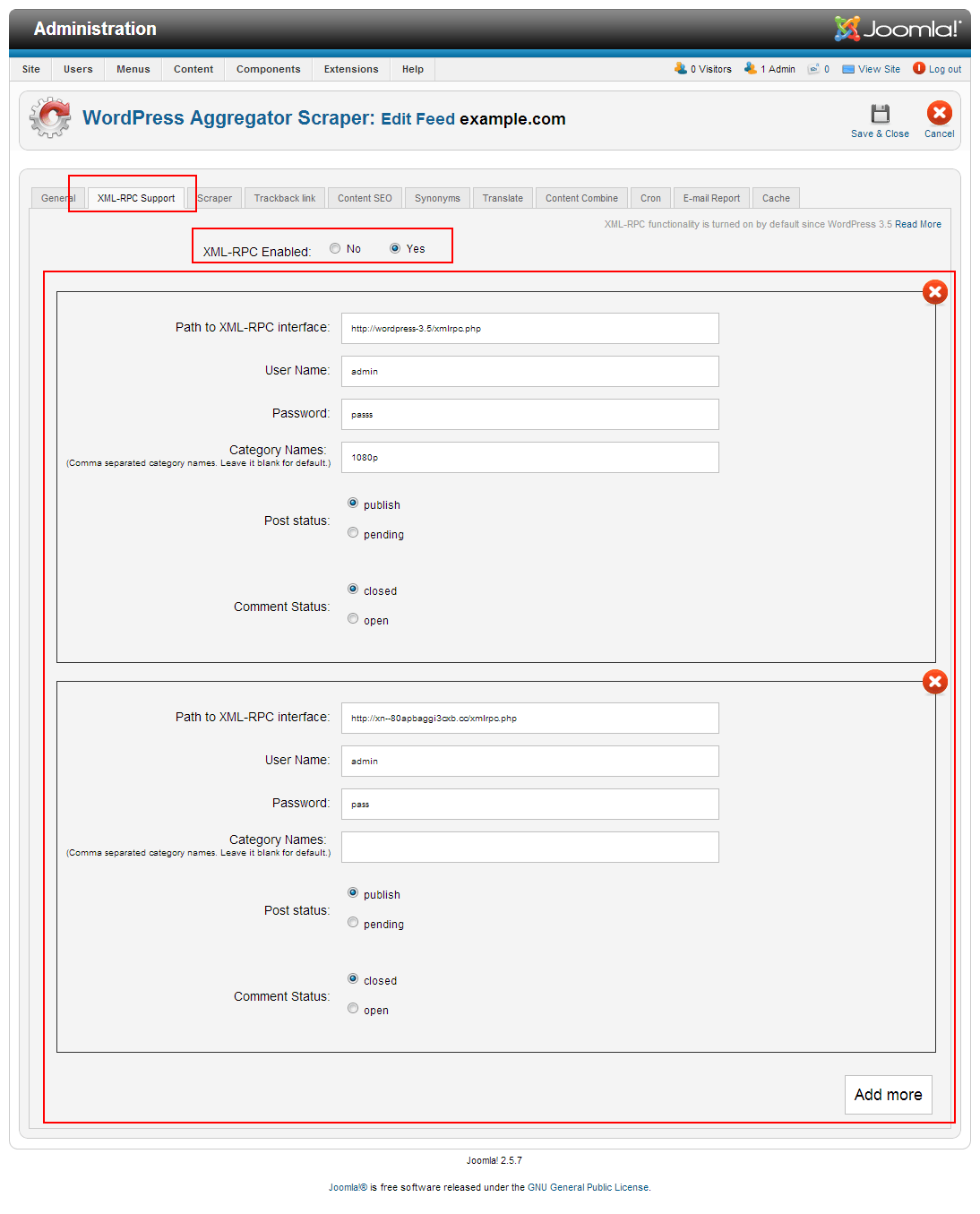 So, you must only check in feed options XMLRPC: Enabled. All steps after Step four are not needed. Have fun
-------------------- Правила на форума | Forum Rules | How to receive support. 3D Web Design: Уеб дизайн, Seo оптимизация, Web Site Extensions, Oscommerce Addons, Wordpress plugins and Joomla Extensions. Изработка на уеб сайтове и оптимизация на сайт за търсачки и Seo услуги.
|
|
|
|
|
1 User(s) are reading this topic (1 Guests and 0 Anonymous Users)
0 Members:


Similar Topics


|
Lo-Fi Version | Time is now: 16th October 2026 - 01:31 AM |