


 Revised Mailorder Content Plugin For J2.5, Latest version for Joomla 3: A New, Completely Revised Mail order Revised Mailorder Content Plugin For J2.5, Latest version for Joomla 3: A New, Completely Revised Mail order |
  |

 Jan 29 2013, 07:50 AM Jan 29 2013, 07:50 AM
Post
#1
|
|
|
Advanced User  Group: Advanced Member Posts: 218 Joined: 15-April 11 Member No.: 761  |
Цитат Current version of plugin is v.1.2.2. Support of old Mail order version (component based) is discontinued from 23 September 2013! New content plugin can be inserted to work everywhere you want, in every Joomla component. Examples for Mosets Tree and content are included in package. Now in Mail Order Pro package are: old version (component for joomla 1.5, for Joomla 2.5 and for Joomla 3.0) and new version (content plugin for Joomla 2.5). Цитат New system plugin to control in which component will work MailOrder is included for free in MailOrder package. This is great opportunity for all Joomla developers - plugin can be used to work in combination with every other content plugin, not only for our plugins. I. What's new? - You may use the MailOrder plugin everywhere on your site, in every component. All you need is to set the relevant INI file (and possibly the plg_system_plginvoker plugin – if you have the Joomla cache enabled or the component you are targeting does not invoke the content plugins itself). Setting the INI file for a component (which I see for the first time in my life) takes me 20 seconds; - It now works with the Joomla cache enabled; - It works way faster than the MailOrder component – almost everything is done using MooTools on the user's browser (the script is less than 3 kB), all the database queries are gone as well (except for these in the Joomla's core classes); - There is no need to use the {mailorder} tag anymore (though you may, if you insist to); - Instead of having one component with two plugins, there is only one plugin now; - It has ReCaptcha support built-in. II. Configuration. There are two types of configuration settings, which are both shaping the plugin's behaviour: a ) Conventional – the plugin's backend settings. Here you can set your preferred language, the text to be displayed above the order form (if any), where the order e-mails should be sent and the ReCaptcha settings. b ) .INI files in the config/ subdirectory. These define where and how the plugin should work. The rest of this section is dedicated to the INI files configuration. By implementing the INI files configuration, we are now able to define a much more complex behavior in addition to speeding up the plugin's performance (the INI files are parsed only once, the plugin then reads the serialized data). The only downside is, that when you make a change in an INI file, you need to manually delete the relevant serialized data .DAT file in the config/cache/ subdirectory in order for the updated settings to be applied. Such needs should arise very rarely, though. So, how this stuff works? 1) When the plugin gets invoked, it retrieves the component's name from the page URL, i.e. com_component; 2) Then it looks for a com_component.dat file (containing the parsed settings for this component) in the config/cache/ directory. If found, goes to 5); 3) If com_component.dat is not found, it looks for com_component.ini in the config/ directory; 4) If com_component.ini is found, it gets parsed and the data is saved in a com_component.dat file within the cache directory. Otherwise the MailOrder plugin is not supposed to work with the com_component component (there is no .ini file) and it returns the control to the caller; 5) The plugin retrieves the com_component related settings, stored in the .dat file; 6) It checks whether and how it should behave in this particular view, task and layout. Then it processes the page, if needed. OK, what is in these INI files? The INI files consists of: - header section (not required); - at least one RUN section (REQUIRED); - 0 or more CLEAR sections (not required) The header section is used to assign default values to some of the ini parameters. If these parameters are met later in a RUN or CLEAR section, their default value will be overwritten with the later one (only for the section they are met in). The following parameters are recognized in the header (and RUN, and CLEAR) section: data_in - a string, which defines in which object property to look for the {mailorder} tag into. Not required. Defaults to "text". window_type – either “modal” or “hs”. Defines the window type of the order form: modal or highslide (“hs”) window_w – integer, the window width (in pixels), defaults to 300. window_h – integer, the window height (in pixels), defaults to 600. formtpl – string, the name (w/o the txt extension) of the order form template. The templates reside in the assets/templates/ folder. They are the same as in the MailOrder component and will not be discussed here. buy – integer, the index of the PLG_CONTENT_MAILORDER_BUY string to be used in the mail order link. The PLG_CONTENT_MAILORDER_BUY strings are defined in the plugin's language files. The RUN section define the plugin's behavior in different view, task and layout URL combinations. It may contain any of the header section's parameters. It must contain at least one of these parameters: view – string, the required value of the "view" page URL parameter, if any layout – string, the required value of the "layout" page URL parameter, if any task – string, the required value of the "task" page URL parameter, if any. These define the conditions, that must be met by the page URL in order for this RUN section's data to be used to control the plugin's behavior. Example 1: Lets say we have a RUN section like this one: Код [RUN] view = category layout = blog … … … and the following page is requested: index.php?option=com_content&view=category&layout=list&task=display&id=1 The above RUN section will be ignored, because it requires the “layout” URL parameter to have value of “blog” (and we have “list”). The “task” URL parameter's value is ignored in our case, as it is not presented in this particular RUN section's definition. The plugin will check the RUN sections in the order they are defined in the INI file. It will use the parameters, defined in the first RUN or CLEAR section, which run parameters (view, layout, task) match the requested URL. The following RUN parameters control the plugin's behavior: [REQUIRED!] moo_container - MooTools selector, marking the entity container. E.g.: if the entire entity resides in a DIV with class "item-page", you should set this to div.item-page; if the entire entity resides in a DIV with ID "item-container", you should set this to div#item-container; [REQUIRED!] moo_title - MooTools selector, marking the element, which contains the entity title (relative to the container). E.g.: if the entity title happens to be a link, residing in the only H2 tag within the entity container, you should set this to h2 a ("Get the text from the A tag, which resides in a H2 tag, which on its side resides in the entity container"); skip - [type: int or string] | [URL parameter name]: [Comma separated list of values] On these values of the URL parameter the plugin won't process the content. owner – string. You need to set this, if the order e-mail is set to be sent to the entity owner. Similar to the moo_title, this is a MooTools selector, marking either the user ID or the e-mail of the entity owner. link – string. You need to set this, if there are more than one entity on the given page, e.g. list of products. Similar to the moo_title, this is a MooTools selector, marking the <a> tag, which contais the link to the entity. If not provided, the URL of the currently viewed page will be put in the order e-mail. inject - [where] | [anchor selector] | [HTML, containing %s] . You might choose (wisely) not to use the {mailorder} tag, but to point the plugin to a location where you want it to put the "Order now" link for you. This can be done by using the "inject" setting: [anchor selector] is a MooTools selector, marking the element (within the container), to which the "Order now" link will be attached; [where] defines the way the "Order now" link will be attached to the anchor, i.e. “after”; Please see http://mootools.net/docs/core/Element/Element#Element:inject for more info. [HTML, containing %s] is the HTML snippet, which will be attached to the anchor. If not set, it defaults to the link itself. Please use only single quotes! The %s will be replaced with the link itself. All the "inject" elements must reside on a single row, separated by the pipe character "|". The CLEAR sections define on which pages the plugin should only remove the {mailorder} tag, if found. Here is an example for the com_content component: Код [CLEAR] view=category layout=blog data_in = introtext Translated: “If the requested page's URL contains view=category and layout=blog, clear the {mailorder} tag from each article's introtext property.” III. Step by step example. Lets set up the MailOrder plugin to work with com_component (having FireFox browser with FireBug installed helps a lot). As I tend to simplify my efforts, I won't use the {mailorder} tag and my articles will remain unchanged. I will use the inject settings instead. We'll do it on a Joomla 2.5 based site with Beez2 site template (the default one). Here we go: 1. Decide which component you are targeting (com_content); 2. Using a FTP client, create an INI file with the component's name in the /plugins/content/mailorder/config/ directory (com_content.ini). Open it for editing. 3. If needed, at the top of the ini file put your default settings (see the heading sections description): Код window_type = modal window_w = 400 window_h = 750 formtpl = default buy = 1 4. Decide on which pages you want the “Order now” buttons to appear, e.g.: - when an user views an article; - when an user views an entire category, but only if the category is with “list” layout. When an user views an article, it accesses an URL like (I shortened the article's alias in order to be able to put the URL on a single row): index.php?option=com_content&view=article&id=2890:abd7...&catid=30&Itemid=601 What are the “run” settings? view: article layout: N/A task: N/A We have only view presented. Lets start our RUN section: Код [RUN] view = article Now we must define the required settings moo_container and moo_title. Here FireBug helps a lot. Right-click on the article's title and select “Inspect with FireBug” (if you don't have FireBug, you may do this step by using the browser's source viewer). Find the element, which contains the whole article. In our case this is a <div class="item-page"> element. The article's title is contained within a link in a h2 tag. So we have in our RUN section: Код moo_container = div.item-page moo_title = h2 a (Find H2 within the container, the find A within H2 and get its contents) Next we must define our “Order now” link (see the inject syntax above). I want it to be positioned directly below the article's title and to look like a button: [where] : “after” the anchor (http://mootools.net/docs/core/Element/Element#Element:inject) [anchor selector]: this is the title, so the selector is the same as moo_title – h2 a [HTML, containing %s]: This the “Order now” link, contained within a div, which is styled to look somewhat like a button (remember – use only single quotes): <br /><div style='background-color:#ffaaaa;padding:7px;border:1px solid black;border-radius:5px;display:inline'>%s</div>. You may define CSS styles, related to the “Order now” link containers, and simply put the %s in such a container, e.g.: <div class='order-now'>%s</div> The whole line should read: Код inject = after | h2 | <br /><div style='background-color:#ffaaaa;padding:7px;border:1px solid black;border-radius:5px;display:inline'>%s</div> If we want to disable the “Order now” link for certain articles, we need to use the skip setting. The URL parameter, pointing to a certain article, is id and it is an integer. So we should use something like: Код skip = int | id: 2889, 2906, 3008, 1756 Put it all together: Код [RUN] view = article moo_container = div.item-page moo_title = h2 a inject = after | h2 | <br /><div style='background-color:#ffaaaa;padding:7px;border:1px solid black;border-radius:5px;display:inline'>%s</div> skip = int | id: 2889, 2906, 3008, 1756 And the result: 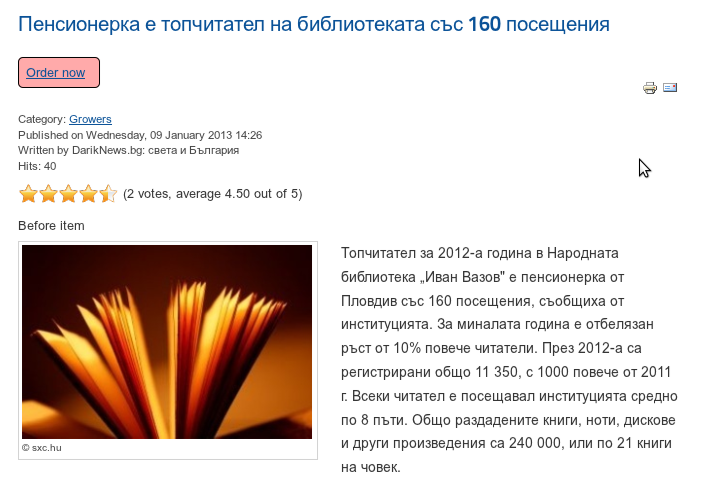  When an user views an entire category in “list” layout, the URL looks like this: /index.php?option=com_content&view=category&layout=list&id=30&Itemid=601 What are the “run” settings? view: category layout: list task: N/A Hense: Код [RUN] view = category layout = list The articles' links are contained in a table, each article occupies a single row. We are interested only in the row's cell which contains the article's title. Again using firebug, we find those cells to have the “list-title” class assigned to them. The article's title is contained within an A tag in the TD cell. So: Код moo_container = td.list-title moo_title = a I want the “Order now” link to be positioned after the article's title. As I want only the link to be displayed, there is no need to define a HTML container: Код inject = after | a Here we have more than one entity on the page and using the page's URL is not suitable for us anymore – it points to the entity collection and not the single entity ordered. We must point to the entity's link within the entity container in moo_container. This is easy, as the link is contained in the same A element, holding the entity (article)'s title: Код link = a Put together: Код [RUN] view = category layout = list moo_container = td.list-title moo_title = a inject = after | a link = a As a result we have an “Order now” link for each article on the page: 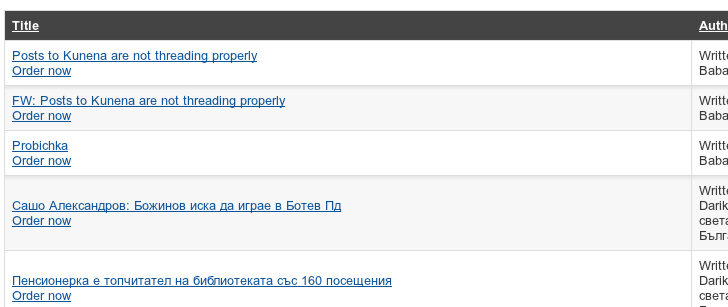 As we don't use the {mailorder} tag, there is no need to define any CLEAR sections. If you have Joomla cache enabled (content plugins are not processed) or the component you intend to use the MailOrder plugin with does not invoke content plugins, you need to get the plg_system_plginvoker plugin. It works with INI files in a way, very similar to the described here. Its sole purpose is to invoke certain plugins (it is not restricted to content ones only). |
 |
 
|




|
Feb 1 2013, 12:24 PM
Post
#2
|
|
 Web Design Seo Group: Root Admin Posts: 4,332 Joined: 29-April 09 From: Sofia Member No.: 1 |
New Mail Order Pro for Joomla 2.5 now is plugin instead of component (older versions to 2.4).
New content plugin can be inserted to work everywhere you want, in every Joomla component. Example for Mosets Tree and content are included in package. Now in Mail Order Pro package are: old version (component for joomla 1.5, for Joomla 2.5 and for Joomla 3.0) and new version (content plugin for Joomla 2.5). Examples For com_content: (included in plg_content_mailorder-standalone-1.0-J25.zip, folder config/examples/) com_content.min.ini: Код window_type = modal window_w = 400 window_h = 750 [RUN] view = article moo_container = div.item-page moo_title = h2 a inject = after | h2 | <br /><div style='background-color:#ffaaaa;padding:7px;border:1px solid black;border-radius:5px;display:inline'>%s</div> [RUN] view = category moo_container = td.list-title moo_title = a link = a inject = after | a [CLEAR] view=category layout=blog data_in = introtext com_content.ini: Код data_in = text window_type = modal window_w = 400 window_h = 750 formtpl = default buy = 1 [RUN] view = article skip = int | id: 2889, 2906 moo_container = div.item-page moo_title = h2 a #owner = #ownermail inject = after | h2 | <br /><div style='background-color:#ffaaaa;padding:7px;border:1px solid black;border-radius:5px;display:inline'>%s</div> [RUN] view = category moo_container = td.list-title moo_title = a link = a inject = after | a [CLEAR] view=category layout=blog data_in = introtext Description of every function is as comment in INI file. -------------------- Правила на форума | Forum Rules | How to receive support. 3D Web Design: Уеб дизайн, Seo оптимизация, Web Site Extensions, Oscommerce Addons, Wordpress plugins and Joomla Extensions. Изработка на уеб сайтове и оптимизация на сайт за търсачки и Seo услуги.
|
|
|
|


|
Feb 1 2013, 12:27 PM
Post
#3
|
|
|
Web Design Seo Group: Root Admin Posts: 4,332 Joined: 29-April 09 From: Sofia Member No.: 1 |
Examples For com_mtree (Mosets Tree): (included in plg_system_plginvoker-J25.zip -> folder config/examples/)
com_mtree.min.ini: Код [RUN] task = viewlink alter_content = 0 context = com_mtree.link plg = content : mailorder plg = content : microformatsvotes com_mtree.ini: Код [RUN] task = viewlink alter_content = 0 context = com_mtree.link plg = content : mailorder plg = content : microformatsvotes #skip = int | link_id: 1, 3, 5 Description of every function is as comment in the same INI file. Edited on 25 February 2013: There was a bug in the content plugin of the newest version: SITE_ROOT was used instead of mo_conf.SITE_ROOT. To fix it, open Код /plugins/content/mailorder/assets/js/plugin.js and replace on lines 30 and 39 Код SITE_ROOT with Код mo_conf.SITE_ROOT (prepend "mo_conf." before "SITE_ROOT")
Reason for edit: bug fix
-------------------- Правила на форума | Forum Rules | How to receive support. 3D Web Design: Уеб дизайн, Seo оптимизация, Web Site Extensions, Oscommerce Addons, Wordpress plugins and Joomla Extensions. Изработка на уеб сайтове и оптимизация на сайт за търсачки и Seo услуги.
|
|
|
|
|
Mar 12 2013, 09:11 AM
Post
#4
|
|
|
Web Design Seo Group: Root Admin Posts: 4,332 Joined: 29-April 09 From: Sofia Member No.: 1 |
Order Pro (new version) update: There is a new version of the content plugin: v.1.1.
It has a new parameter available for use in the ini file, called "run_only_at". It has the same syntax as the "skip" parameter and the opposite behavior, allowing to list only the pages you want the plugin to work at. -------------------- Правила на форума | Forum Rules | How to receive support. 3D Web Design: Уеб дизайн, Seo оптимизация, Web Site Extensions, Oscommerce Addons, Wordpress plugins and Joomla Extensions. Изработка на уеб сайтове и оптимизация на сайт за търсачки и Seo услуги.
|
|
|
|
|
Mar 12 2013, 11:40 AM
Post
#5
|
|
|
Web Design Seo Group: Root Admin Posts: 4,332 Joined: 29-April 09 From: Sofia Member No.: 1 |
Today is released new version for Joomla 3.0. Now new version of MailOrder content plugin support Joomla 3.
-------------------- Правила на форума | Forum Rules | How to receive support. 3D Web Design: Уеб дизайн, Seo оптимизация, Web Site Extensions, Oscommerce Addons, Wordpress plugins and Joomla Extensions. Изработка на уеб сайтове и оптимизация на сайт за търсачки и Seo услуги.
|
|
|
|
|
Apr 9 2013, 03:07 PM
Post
#6
|
|
|
Web Design Seo Group: Root Admin Posts: 4,332 Joined: 29-April 09 From: Sofia Member No.: 1 |
Today Mail Order Pro package is updated. Are included more template files, more examples and new step by step guide and FAQ as pdf files in English and in Bulgarian.
Inside examples folder you have 2 type of examples:
 Inside Frequently asked questions are answers of these questions:
-------------------- Правила на форума | Forum Rules | How to receive support. 3D Web Design: Уеб дизайн, Seo оптимизация, Web Site Extensions, Oscommerce Addons, Wordpress plugins and Joomla Extensions. Изработка на уеб сайтове и оптимизация на сайт за търсачки и Seo услуги.
|
|
|
|
|
Sep 16 2013, 06:20 AM
Post
#7
|
|
|
Web Design Seo Group: Root Admin Posts: 4,332 Joined: 29-April 09 From: Sofia Member No.: 1 |
You have many examples, full step by step guide and FAQ guides inside plugin as txt file, pdf and as open office files.
Screenshots: - from plugin zip folder content. - config folder - examples folder -------------------- Правила на форума | Forum Rules | How to receive support. 3D Web Design: Уеб дизайн, Seo оптимизация, Web Site Extensions, Oscommerce Addons, Wordpress plugins and Joomla Extensions. Изработка на уеб сайтове и оптимизация на сайт за търсачки и Seo услуги.
|
|
|
|
|
Nov 4 2013, 06:17 PM
Post
#8
|
|
|
Newbie Group: Members Posts: 1 Joined: 1-November 13 Member No.: 1,878 |
Hi,
I didn't know the mailorder and I purchased it because I need placing the order in a page of the products. I'm using the K2 for placed the features regarding the products. I was look at the file "com_k2.ini", but I didn't see more diferences about settings related the "com_content.ini". However, the button "order now" isn't displayed on the page. The cache isn't enabled. How do I obtain support for to do it settings in my case? Regards Felipe |
|
|
|

|
Nov 5 2013, 01:47 PM
Post
#9
|
|
|
Php programmer Group: Administrators Posts: 285 Joined: 26-November 12 From: Bulgaria Member No.: 1,452 |
Цитат(Felipe @ Nov 4 2013, 08:17 PM)  Hi, I didn't know the mailorder and I purchased it because I need placing the order in a page of the products. I'm using the K2 for placed the features regarding the products. I was look at the file "com_k2.ini", but I didn't see more diferences about settings related the "com_content.ini". However, the button "order now" isn't displayed on the page. The cache isn't enabled. How do I obtain support for to do it settings in my case? Regards Felipe Hi Felipe, I will suggest that you are entering wrong dom selectors or not deleting cache files located in "/plugins/content/mailorder/config/cache/" If you can't manage this by your own, send us FTP url/user/password to "admin att 3dwebdesign.org" in order to help you. Best, Pavel -------------------- Php programmer in 3D Web Design
|
|
|
|

|
Nov 10 2013, 11:49 PM
Post
#10
|
|
|
Newbie Group: Members Posts: 2 Joined: 24-May 13 Member No.: 1,696 |
Hi,
I try to change product name on mailorder. for example {mailorder id=XX} is exist however i want to change name of the product like {mailorder productname=XXXX} is it possible sending like parameter ? thanks for your support |
|
|
|
|
Nov 11 2013, 11:54 AM
Post
#11
|
|
|
Php programmer Group: Administrators Posts: 285 Joined: 26-November 12 From: Bulgaria Member No.: 1,452 |
Цитат(Palindrom @ Nov 11 2013, 01:49 AM) Hi, I try to change product name on mailorder. for example {mailorder id=XX} is exist however i want to change name of the product like {mailorder productname=XXXX} is it possible sending like parameter ? thanks for your support This is not possible. Product name is taken with javascript. You can create html in your content and point ini file to get title from there. Example: create html: <div id="my_alt_title" style="display:none;">Special Title invisible on page</div> Set configuration in ini file: moo_title=#my_alt_title -------------------- Php programmer in 3D Web Design
|
|
|
|
|
Nov 27 2013, 01:50 PM
Post
#12
|
|
|
Web Design Seo Group: Root Admin Posts: 4,332 Joined: 29-April 09 From: Sofia Member No.: 1 |
Old and new version of Mail Order Pro are completely FREE from today - 27 November 2013.
Download and enjoy 
-------------------- Правила на форума | Forum Rules | How to receive support. 3D Web Design: Уеб дизайн, Seo оптимизация, Web Site Extensions, Oscommerce Addons, Wordpress plugins and Joomla Extensions. Изработка на уеб сайтове и оптимизация на сайт за търсачки и Seo услуги.
|
|
|
|
|
Jul 14 2015, 08:58 AM
Post
#13
|
|
|
Web Design Seo Group: Root Admin Posts: 4,332 Joined: 29-April 09 From: Sofia Member No.: 1 |
Plugin is updated to V.1.2.2. Changes: Added support for parameter "controller" (untill now only task, file and view). Added example ini file for JoomShopping - com_jshopping.
To do: system invoker plugin must be updated to work with Joomla 3. Help us to make plugin better and to share it with Joomla community: help us in github: https://github.com/3DWebDesign/system-invoker-plugin-joomla -------------------- Правила на форума | Forum Rules | How to receive support. 3D Web Design: Уеб дизайн, Seo оптимизация, Web Site Extensions, Oscommerce Addons, Wordpress plugins and Joomla Extensions. Изработка на уеб сайтове и оптимизация на сайт за търсачки и Seo услуги.
|
|
|
|
|
1 User(s) are reading this topic (1 Guests and 0 Anonymous Users)
0 Members:


Similar Topics
| Topic | Replies | Topic Starter | Views | Last Action | |
|---|---|---|---|---|---|
 |
Pinned:  Plugin To Delete Expired Articles Automatically Plugin To Delete Expired Articles Automaticallyplugin that automate deletion of expired articles |
1 | Web Design Seo | 364,714 | 14th October 2019 - 06:37 AM Last post by: Web Design Seo |
|
Mailorder In Costum Module | 1 | Robert Johansson | 66,735 | 2nd July 2018 - 06:46 AM Last post by: Web Design Seo |
|
Mailorder Pro Plugin Blank Form In Internet Explorer 9 mailorder pro plugin blank form in internet explorer 9 |
3 | rajinfosys | 66,690 | 27th February 2017 - 10:25 AM Last post by: Web Design Seo |
|
Format Lost In Post By E-mail | 3 | gibor | 188,264 | 9th January 2014 - 07:00 AM Last post by: Web Design Seo |
|
Mailorder's Custom Product Name i try to change mailorder's product name with given parameter like |
1 | Palindrom | 20,958 | 11th November 2013 - 02:09 PM Last post by: pavelKukov |
|
Mailorder In A Module | 1 | webed | 23,279 | 26th September 2013 - 06:02 AM Last post by: Web Design Seo |
|
Pinned: Content Authors Plugin For Payments For Joomla paid access to user groups in Joomla 2.5 |
0 | Web Design Seo | 26,149 | 2nd July 2012 - 08:33 AM Last post by: Web Design Seo |
 |
Mailorder Pro, Error 404 With Id=xx | 5 | Pierre B-W | 35,648 | 14th May 2012 - 03:04 PM Last post by: Web Design Seo |
|
Content Time Stamp Content Time Stamp |
2 | Xlibiris | 14,486 | 4th May 2012 - 03:22 PM Last post by: Xlibiris |
|
Mailorder Pro 1.7 Form | 1 | bowden | 16,317 | 1st February 2012 - 08:16 AM Last post by: Web Design Seo |

|
Lo-Fi Version | Time is now: 15th October 2026 - 02:25 PM |