


 Post By Email 1.3.4 Doesn`t Import Mails [solved], Configuration or component not working Post By Email 1.3.4 Doesn`t Import Mails [solved], Configuration or component not working |
  |

 Dec 6 2010, 10:05 PM Dec 6 2010, 10:05 PM
Post
#1
|
|
|
Newbie  Group: Members Posts: 4 Joined: 6-December 10 Member No.: 422  |
I recently bought a Joomla Post by Email component. First, I have installed 1.3.3 version, and then I have upgrade to 1.3.4 version. 1.3.3 version doesn`t show me saves configuration values, but 1.3.4 solve the problem.(browser mozilla firefox). My problem is component doesn't import mails , it tell me after Import All button click, 0 mails imported. I don't know my configuration component is fine. Add Email Habilitado Sí Título: foro@puntoefe.org Mail Settings Mail Server: pop3.puntoefe.org Port: 110 Login Name: foro26+puntoefe.org foro26 must be? Contraseña: --> Here is password Delete Processed Content?: No Publish Settings Where to put content?: Kunena Forum Artículos Sección: Noticias Categoría: ûltimas Noticias Publish content automatically: No Publish to front page: No Publish duration: 0 Nivel de acceso: Registered Default author: fito JoomSocial Wall App User wall: Agora Forum Forum: Kunena Forum Post replay or new topic: Sí Forum: ... Bienvenido Mat... Buzón de Sugerencias Thread id: Global Settings User creator: Fito Configuration Email Data in Outlook Express for example: email: foro@puntoefe.org pop3 server: pop3.puntoefe.org user pop3: foro26 password: ---> Here is password No SSL, no TLS, no secure autenthication, no SMTP autenthication. WebMail just foro26 and his password. Is necessary adjust configuration settings in Kunena? If I solve problem, how can I do for automate the component? Hosting Web Control Panel is AllyTech Daytona (/dcm) It has Cron Jobs and I know I must create a cron task job. How can I create code for it and what code put at Cron Task Job? Sorry, my english. I speak spanish. Thank you very much for your attention. Best Regards, Marcelo. |
 |
 
|




|
Dec 7 2010, 08:43 AM
Post
#2
|
|
 Web Design Seo Group: Root Admin Posts: 4,332 Joined: 29-April 09 From: Sofia Member No.: 1 |
Hello, Marcelo.
See at this screen how to configure your email box: 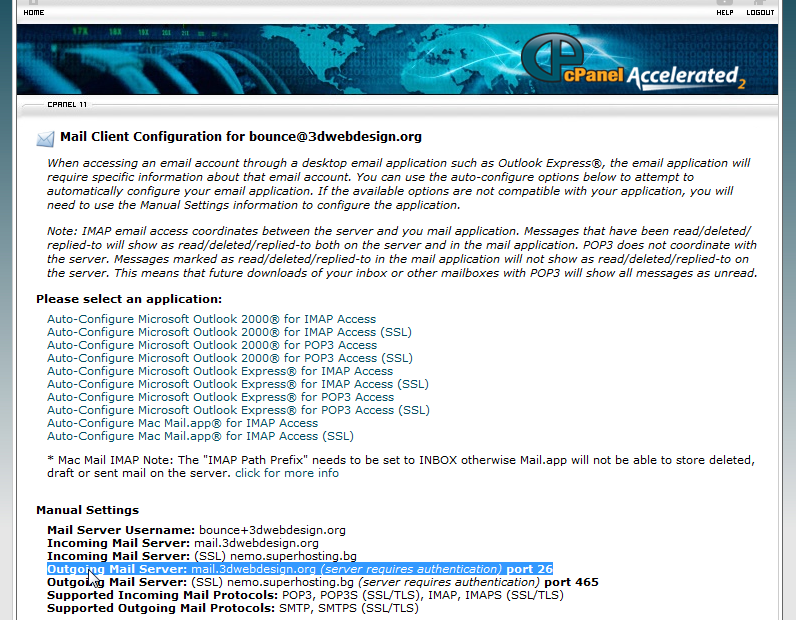 In most cases problem is in PORT option. Test with different ports, your host may work with standart 110 or with other. Every server has your own email prferences, You must grab prefereneces from your host control panel or send question to support of your hosting. Here is description of functions of Post By Email About cronjobs: Are two ways to schedule your mailboxes: Open cronjobs page in cpanel and set up this to run every 5 minutes in example: Код curl -sS "http://your-post-by-email-site.com/administrator/components/com_post_by_email/cron.post_by_email.php" >> /dev/null or this code: Код /usr/local/bin/php -q /relative path to host public_html directory/administrator/components/com_post_by_email/cron.post_by_email.php >> /dev/null This code at bottom of your template may work also: Код <iframe src="http://my.site/administrator/components/com_post_by_email/cron.post_by_email.php/" name="mailiframe" width="0" height="0" frameborder="0" scrolling="no" title=""></iframe> This may will help You: support topic of Post By Email -------------------- Правила на форума | Forum Rules | How to receive support. 3D Web Design: Уеб дизайн, Seo оптимизация, Web Site Extensions, Oscommerce Addons, Wordpress plugins and Joomla Extensions. Изработка на уеб сайтове и оптимизация на сайт за търсачки и Seo услуги.
|
|
|
|


|
Dec 7 2010, 04:44 PM
Post
#3
|
|
|
Newbie Group: Members Posts: 4 Joined: 6-December 10 Member No.: 422 |
We have tried multiples configurations but the component not working for us.
We have tried multiples data configurations, multiples incoming servers, but without results. We have tried import to Kunena and then in Articles, but no results. Can you help us for correct configuration? Tranks in advance. Marcelo. Configuration Attached  |
|
|
|
|
Dec 7 2010, 05:04 PM
Post
#4
|
|
|
Web Design Seo Group: Root Admin Posts: 4,332 Joined: 29-April 09 From: Sofia Member No.: 1 |
Please, create one temporary admin account for us and PM me login data for this account.
We will test your system tomorrow morning. -------------------- Правила на форума | Forum Rules | How to receive support. 3D Web Design: Уеб дизайн, Seo оптимизация, Web Site Extensions, Oscommerce Addons, Wordpress plugins and Joomla Extensions. Изработка на уеб сайтове и оптимизация на сайт за търсачки и Seo услуги.
|
|
|
|
|
Dec 7 2010, 05:22 PM
Post
#5
|
|
|
Newbie Group: Members Posts: 4 Joined: 6-December 10 Member No.: 422 |
Ok, We send by PM data required.
Many thanks for your help. Best regards from Patagonia Argentina. Marcelo. |
|
|
|
|
Dec 10 2010, 10:45 AM
Post
#6
|
|
|
Web Design Seo Group: Root Admin Posts: 4,332 Joined: 29-April 09 From: Sofia Member No.: 1 |
We investigate you problem.
Problem is taht You have many disabled functions in php at your server - fsockopen function and many more. No way to work of extension at this server. Please, use normal server configuration. If server is not yours and server admin dont want to change php configuration of server - move your website at other server at normal host company. -------------------- Правила на форума | Forum Rules | How to receive support. 3D Web Design: Уеб дизайн, Seo оптимизация, Web Site Extensions, Oscommerce Addons, Wordpress plugins and Joomla Extensions. Изработка на уеб сайтове и оптимизация на сайт за търсачки и Seo услуги.
|
|
|
|
 Dec 14 2010, 06:48 AM Dec 14 2010, 06:48 AM
Post
#7
|
|
|
Newbie Group: Members Posts: 4 Joined: 6-December 10 Member No.: 422 |
Ok, fsockopen() function is already enabled from host server. We comunicate with administrator and he solved problem.
We have some problems with cron jobs at server but we will fix them with hosting server administrator. We have some questions more. Post by Email can post new post themes in categories from emails accounts? Post by Email can post replies in categories from emails accounts? We think yes, there is a param in kunena section. We switch to yes.(Post replay or New Topic switch to yes) Kunena Thread Id must be completed? Can Thread Id be empty? User Creator in Global settings can be empty? In our website, there are registered kunena users with emails accounts and they post from their emails, but they don´t appear in Kunena topics or replies with their usernames, only user creator appears and we don´t know who post really. This Is it? Finally, we think our configuration isn´t ok, and we must correct it. Thanks in advance. Best regards. Marcelo. |
|
|
|
|
Dec 15 2010, 09:11 AM
Post
#8
|
|
|
Web Design Seo Group: Root Admin Posts: 4,332 Joined: 29-April 09 From: Sofia Member No.: 1 |
Цитат(Marcelo E. Viñuela @ Dec 14 2010, 08:48 AM)  We have some questions more. 1. Post by Email can post new post themes in categories from emails accounts? 2. Post by Email can post replies in categories from emails accounts? We think yes, there is a param in kunena section. We switch to yes.(Post replay or New Topic switch to yes) 3. Kunena Thread Id must be completed? Can Thread Id be empty? 4. User Creator in Global settings can be empty? 5. In our website, there are registered kunena users with emails accounts and they post from their emails, but they don´t appear in Kunena topics or replies with their usernames, only user creator appears and we don´t know who post really. This Is it? 1. Yes 2. Yes, but you must first: - create topic - create user account that post reply 3. If you want to post in some topic Thread Id must be completed. 4. No. 5. You must create new email box for every user and configure this box to post in forum and configure user creator for every configured email. -------------------- Правила на форума | Forum Rules | How to receive support. 3D Web Design: Уеб дизайн, Seo оптимизация, Web Site Extensions, Oscommerce Addons, Wordpress plugins and Joomla Extensions. Изработка на уеб сайтове и оптимизация на сайт за търсачки и Seo услуги.
|
|
|
|
|
1 User(s) are reading this topic (1 Guests and 0 Anonymous Users)
0 Members:


Similar Topics


|
Lo-Fi Version | Time is now: 15th October 2026 - 11:04 PM |