


 Csv Import Export Free Joomla Component, Free Joomla CSV Import and Export Component Csv Import Export Free Joomla Component, Free Joomla CSV Import and Export Component |
  |

 Apr 2 2014, 09:52 AM Apr 2 2014, 09:52 AM
Post
#1
|
|
 Web Design Seo  Group: Root Admin Posts: 4,332 Joined: 29-April 09 From: Sofia Member No.: 1  |
Is released Free Joomla CSV Import and Export Component - com_csvimportexport-1.0.0. Component is not yet published as separate file, is included only in latest Post by Email package (post_by_email_pro_v.1.9.5 for joomla 3). This component add new features to our popular component Post by Email - to import csv files attached to emails. For now is supported only Joomla 3. CSV Import Export - Description of functions: # CSVImportExport - 1.0.0 # Author: 3D Web Design, WebSite: 3dwebdesign.org, Date: 2014-04-02 **Requirements**: **joomla 3.x** **MySQL database** **PHP > 5.3.1** **Recommended**: **PHP > 5.4** Description: Import CSV formated data directly into selected table from database used by joomla site. Export database table data into CSV formated document. Selective CSV index mapping to table column. Integration with "Post By Email" v.1.9.5 (or higher) for joomla 3.x Special cases: 1. When primary key for some row is duplicated from CSV value(if is configured) than this row will be updated. Primary key columns are marked in table details view with "PRI" in key column 2. CSV values count starts from 1 Applications: 1. You can back up and restore data with ease 2. You can export data to CSV format with primary key included. Open document in "Libreoffice Match" or similar software and do some calculations. Then import modified file and update entire database table. 3. Import data into any table from any CSV source. Import spreadsheets into tables of joomla components. For example you can export wordpress articles and import them into joomla content. 4. Import CSV attachments to emails for import into joomla tables - **requires Post By Eamil > 1.9.4** 5. Use only email parameters, without CSV attachments, to fill any database table with emailed content. Usage as standalone component: 1.1. Install component 1.2. From joomla administrator top menu, navigate to "Components -> CSV Import Export" 1.3. Click on the left hand side "New" 1.3.1 Type label for your new configuration in "Label" field 1.3.2 Select target table from database. Use "Table Name" drop-down list. This will load table information bellow. 1.3.3 From the "CSV N Value" column you can choose which CSV values to be imported into respective table columns. "Use Default" means that for this column will not be used value from CSV document. This will be helpful for timestamps or autoincrement columns. 1.3.4 When ready with above click "save & close" This will save configuration and send you back in the list view. 1.4 In list view you will see Status, Label, Table Name, Actions and ID 1.4.1 Status is not used for now, but is added for compatibility and hypothetical further development and usage purposes 1.4.2 Label is the name for this configuration 1.4.3 Table Name is the name of database table for which is this configuration. One table can have multiple configurations. 1.4.4 Action column is holding two buttons with main component functionality. 1.4.5 ID is unique identifier if this configuration 1.5 Click on "Import From File" to select CSV file from which data to be imported into database table 1.6 Click on "Export Data" to export data from table into CSV format Usage with "Post By Email": 1.1. Install component 1.2. From joomla administrator top menu, navigate to "Components -> CSV Import Export" 1.3. Click on the left hand side "New" 1.3.1 Type label for your new configuration in "Label" field 1.3.2 Select target table from database. Use "Table Name" drop-down list. This will load table information bellow. 1.3.3 From the "CSV Value or Email Data" column you can choose which **CSV values or email data** to be imported into respective table columns. "Use Default" means that for this column will not be used value from CSV document. This will be helpful for timestamps or autoincrement columns. Choose email data to be used as values for selected columns. 1.3.4 When ready with above click "save & close" This will save configuration and send you back in the list view. 1.4 In list view you will see Status, Label, Table Name, Actions and ID 1.4.1 Status is not used for now, but is added for compatibility and hypothetical further development and usage purposes 1.4.2 Label is the name for this configuration 1.4.3 Table Name is the name of database table for which is this configuration. One table can have multiple configurations. 1.4.4 Action column is holding two buttons with main component functionality. 1.4.5 ID is unique identifier if this configuration 1.5 Click on "Import From File" to select CSV file from which data to be imported into database table 1.6 Click on "Export Data" to export data from table into CSV format 1.7 From joomla administrator top menu, navigate to "Components -> Post By E-mail" 1.8 Click on the left hand side "New" 1.9 Configure Post By Email 1.9.1 In "Publishing Settings" sections set "Publish the content in" to "CSV Import/Export" 1.9.2 In "CSV Import/Export" section set "Please select configuration id" to desired configuration. 1.10 When ready with above click "save & close" This will save configuration and send you back in the list view. 1.11. Check newly created PBM configuration and click "import". List view of import/export component. From here you can import or export data in CSV format.  Creating new CSV configuration for database table. 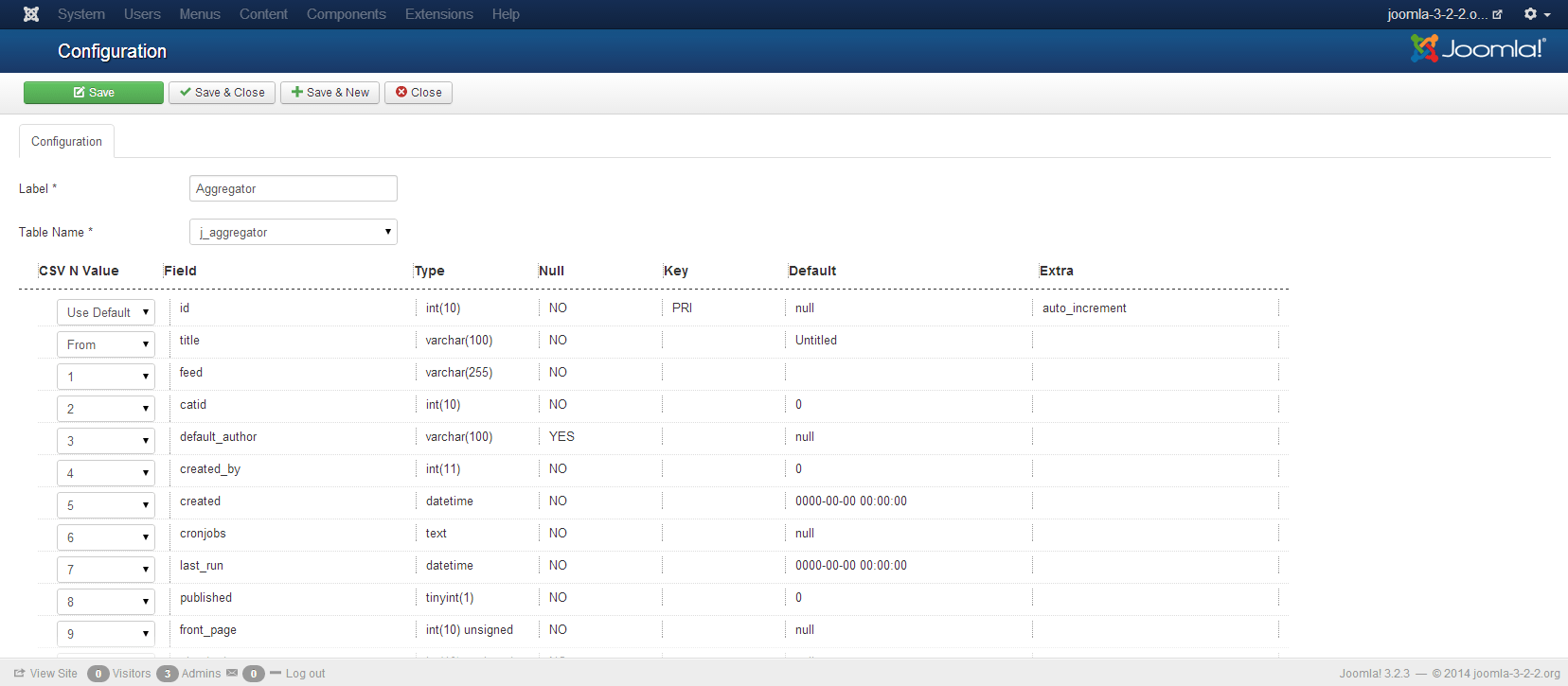 Post By Email - If yes(default) is selected all attachments will be appended to the end of email text. 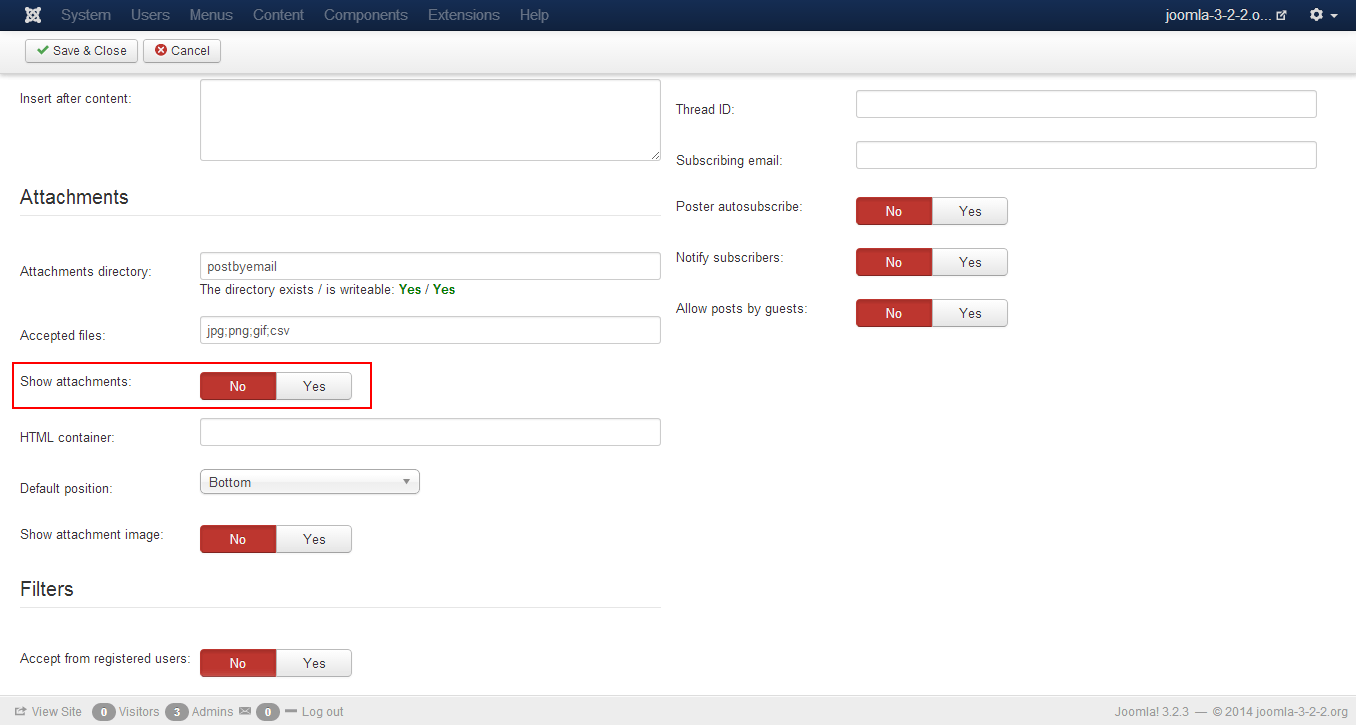 Post By Email - Select which CSV configuration to be used for this email. 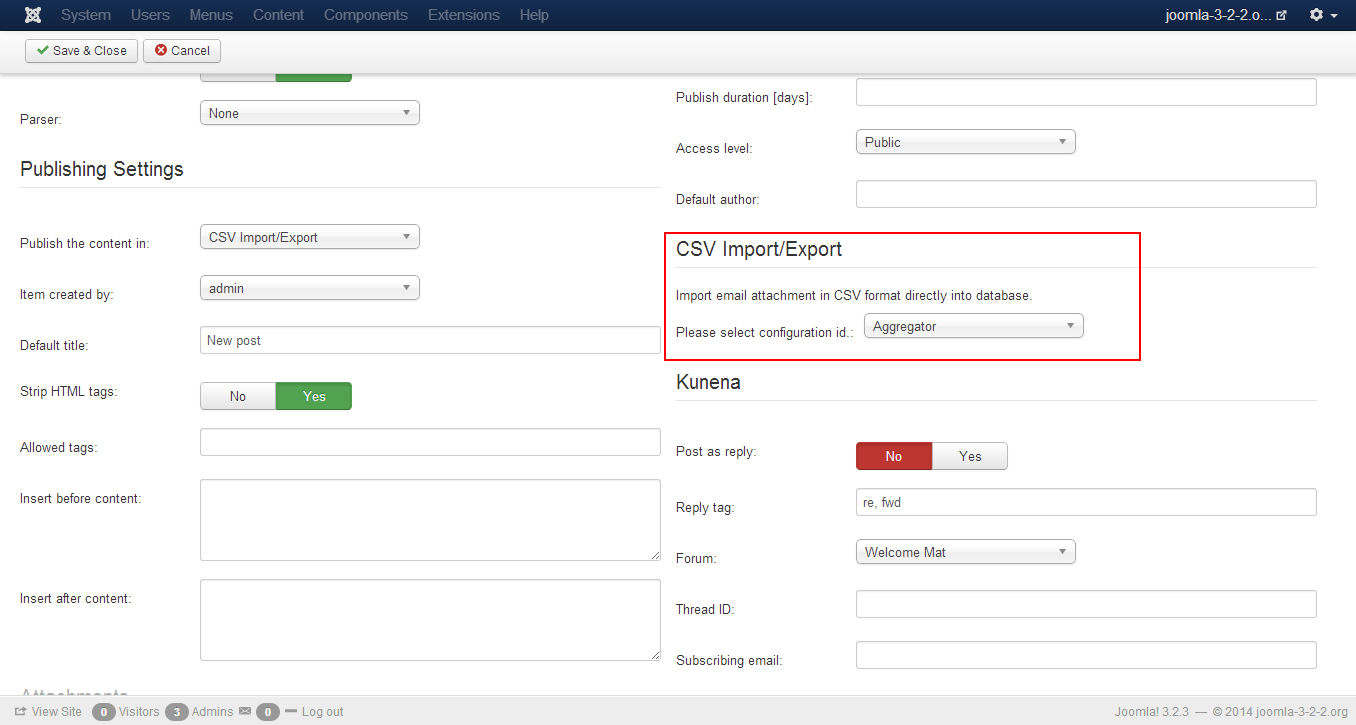 Useful links: Post By Email and Post By Email functions and guides. -------------------- Правила на форума | Forum Rules | How to receive support. 3D Web Design: Уеб дизайн, Seo оптимизация, Web Site Extensions, Oscommerce Addons, Wordpress plugins and Joomla Extensions. Изработка на уеб сайтове и оптимизация на сайт за търсачки и Seo услуги.
|
 |
 
|


|
Jun 23 2014, 10:18 AM
Post
#2
|
|
|
Web Design Seo Group: Root Admin Posts: 4,332 Joined: 29-April 09 From: Sofia Member No.: 1 |
Planeed for next release: If value is missing from CSV file and column have default value import will continue.
In actual version, this will interrupt import. -------------------- Правила на форума | Forum Rules | How to receive support. 3D Web Design: Уеб дизайн, Seo оптимизация, Web Site Extensions, Oscommerce Addons, Wordpress plugins and Joomla Extensions. Изработка на уеб сайтове и оптимизация на сайт за търсачки и Seo услуги.
|
|
|
|
 Mar 24 2015, 06:06 AM Mar 24 2015, 06:06 AM
Post
#3
|
|
|
Newbie Group: Members Posts: 1 Joined: 24-March 15 Member No.: 2,188 |
and where you can see it?
download touch |
|
|
|



|
Mar 24 2015, 06:58 AM
Post
#4
|
|
|
Web Design Seo Group: Root Admin Posts: 4,332 Joined: 29-April 09 From: Sofia Member No.: 1 |
CSV Component is included only in Post by Email component's package - is developed only as bonus for our Post by Email users.
-------------------- Правила на форума | Forum Rules | How to receive support. 3D Web Design: Уеб дизайн, Seo оптимизация, Web Site Extensions, Oscommerce Addons, Wordpress plugins and Joomla Extensions. Изработка на уеб сайтове и оптимизация на сайт за търсачки и Seo услуги.
|
|
|
|
|
1 User(s) are reading this topic (1 Guests and 0 Anonymous Users)
0 Members:


Similar Topics
| Topic | Replies | Topic Starter | Views | Last Action | |
|---|---|---|---|---|---|
 |
Pinned:  Joomla Scraper, Grabber For Joomla Joomla Scraper, Grabber For JoomlaJoomla Scraper Can Grab Any Content From Any Website |
86 | Web Design Seo | 672,550 | 8th September 2021 - 07:02 AM Last post by: Web Design Seo |
|
Pinned: Importing Youtube how to import Youtube feeds |
13 | NVC Academy | 80,877 | 22nd July 2020 - 11:28 AM Last post by: Web Design Seo |
 |
Pinned: Free Online Domain Name Generator Tool generate lists with domains from keywords |
0 | Web Design Seo | 45,388 | 22nd February 2019 - 09:54 AM Last post by: Web Design Seo |
|
Pinned: Free Bulk Keyword Volume And Cpc Checker free keyword seo checker tool to check search volume and keywords cpc |
0 | Web Design Seo | 41,484 | 8th January 2019 - 08:16 AM Last post by: Web Design Seo |
|
Free Punycode To Idn Converter convert list of domains from Punycode to IDN |
0 | Web Design Seo | 45,462 | 7th December 2018 - 10:37 AM Last post by: Web Design Seo |
|
Free Idn To Punycode Converter convert list of domains from Idn To Puny-code |
0 | Web Design Seo | 50,682 | 7th December 2018 - 10:31 AM Last post by: Web Design Seo |
|
Pinned: Joomla Vulnerable Extensions List list with new Joomla exploits |
20 | Web Design Seo | 457,558 | 26th September 2018 - 05:07 AM Last post by: Web Design Seo |
|
Pinned: Joomla Pagination Seo Plugin SEO plugin for Joomla Pagination that work in all Joomla |
61 | Web Design Seo | 562,037 | 13th March 2018 - 10:05 AM Last post by: mxcpz |
|
Importing Images That Are In The Rss Feed As A Media File | 1 | Kat | 55,496 | 28th July 2017 - 07:44 PM Last post by: Kat |
|
Pinned: Joomla Scraper Going Open Source No licenses, use scraper on unlimited number of web sites |
0 | Web Design Seo | 416,192 | 8th March 2017 - 07:40 AM Last post by: Web Design Seo |

|
Lo-Fi Version | Time is now: 15th October 2026 - 01:24 PM |