


 How To Optimize Speed And Server Load For Joomla Website?, How to reduce server load for Joomla site How To Optimize Speed And Server Load For Joomla Website?, How to reduce server load for Joomla site |
  |

 Jan 15 2020, 09:17 AM Jan 15 2020, 09:17 AM
Post
#1
|
|
 Web Design Seo  Group: Root Admin Posts: 4,332 Joined: 29-April 09 From: Sofia Member No.: 1  |
Guide updated for the latest version of Joomla! 3 for 2020! Joomla Server Load Reduction Guide - How To Make A Joomla Site Easier And Faster - points are prioritized, that is, the first point is the most important, the second is the least important: Цитат The steps described in this guide are just things specific to Joomla, without the common rules for all types of websites, such as compressing CSS, Javascript and images, and merging scripts and styles into one file. These few tips will help you have a faster, more secure and lighter for a server Joomla - you will pay a lot less money for hosting, your hosting company will be happy, and you will get higher Google ranking and more money! General Tips: 1. Turn off any unnecessary Joomla add-ons you don't use! 2. Delete the Joomla add-ons that are installed on your site but you do not use. 3. Flush the cache wherever available. 4. There are two options for cache in the jumble - in global settings and a system plugin. Specific Joomla settings for a lighter and faster site: 1. Set up your server to use caching and compression for certain file types. Upload the code to the htaccess file in the public_html directory of your site. The code is here: htaccess code to speed up Joomla. Use Exactly This Code - Comment 6. 2. Use the maximum possible version of PHP that your site runs correctly. If possible, include PHP 7.3 or at least PHP 7.2. Every newer version of PHP is faster, more secure and uses less server resources! Check out a hosted Superhosting test that documents changes to blog load times with different versions of PHP - from 5.6 to 7.3: PHP version speed up case 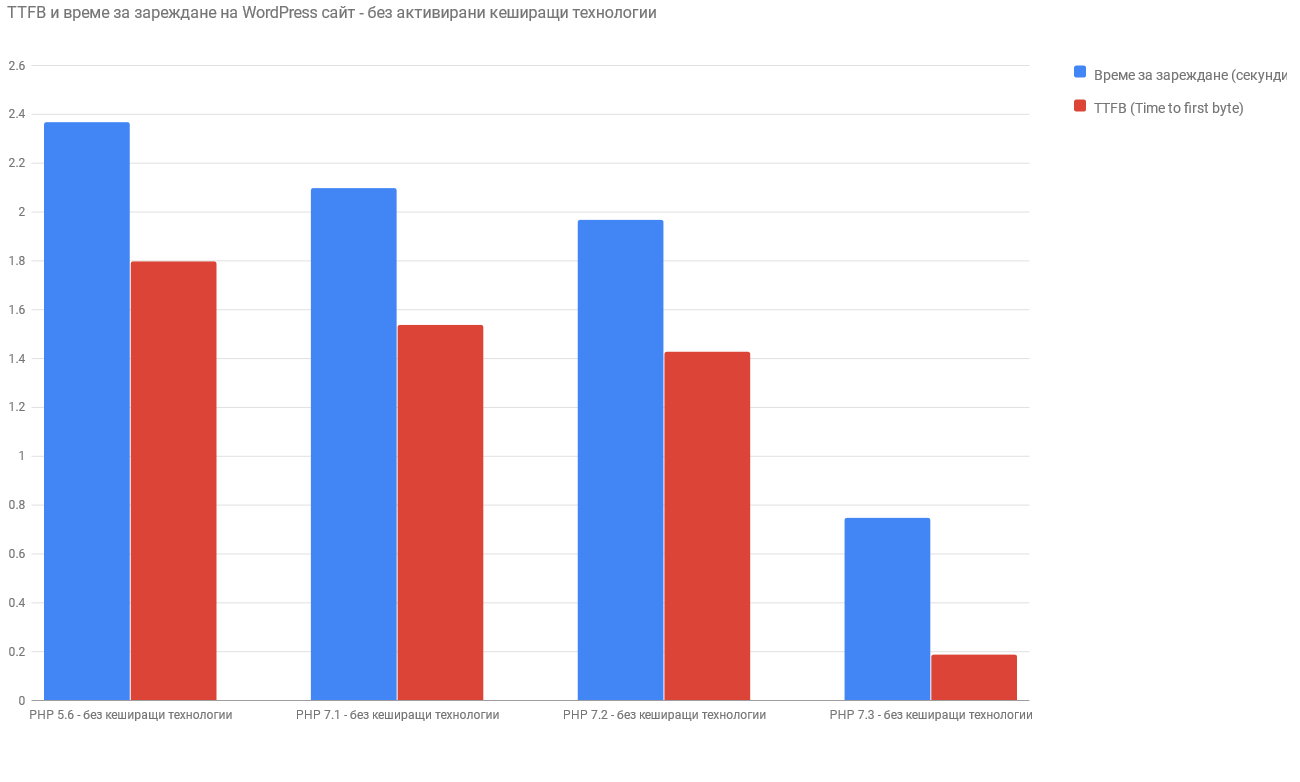 3. Global System Settings: First, check that you have the cache of Joomla Global Settings turned on. You turn on the cache and set Conservative cache. If your hosting supports it, you can also use memcached caching, which is faster than file caching. 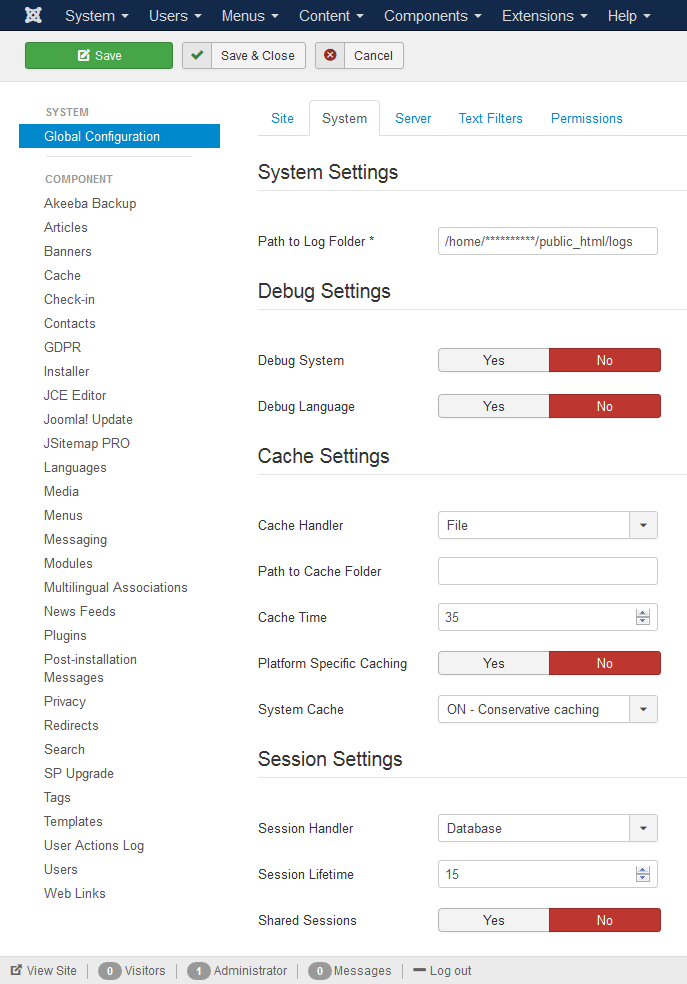 4. Global System Settings: Session Duration: Use as little value as possible, for example, I never use a value over 15 minutes. To use 50-60 minutes or more on a site that has many registered users KILLS your site while slowing it down! And it also lifts the load on the server! 5. Module settings: You then check that each module is cached, and possibly increase its caching time by 900 seconds or more. We usually use 9000 seconds. 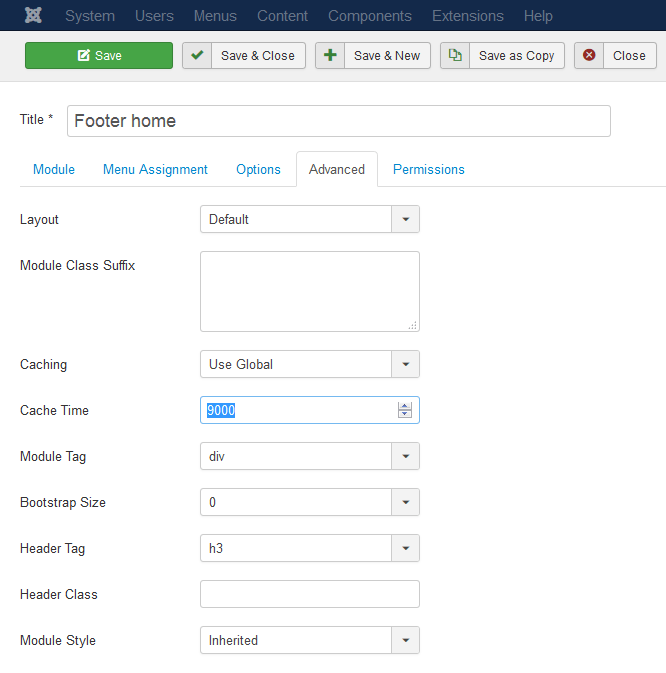 6. Module settings: Check that the "prepare content" option is also enabled in each module. This involves parsing the content plugins for the current module and also increasing the load. Leave this option on ONLY for which module you need it, not for all! 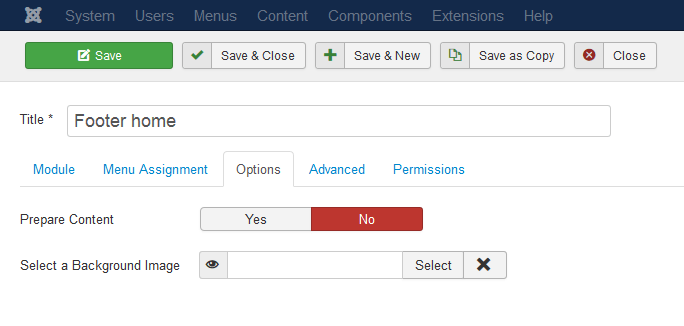 7. Then come steps such as shutting down some modules and features. For example, features such as "show the most popular posts" or "show the number of products in categories" are quite heavy and load the server, even if their cache is turned on - at the moment when their cache is refreshed, they slow down a lot. 8. Tips and tricks: If so many people want to have such information on a page (most popular publications, number of products per category), you include the module, take the content that the module generates, copy it as HTML code and insert it into a static HTML module. Then you switch off the standard module and switch on the static HTML module. So you have the information on the page, but it is static and does not load the server. Then, over a period of time, you follow the same procedure to update the content. 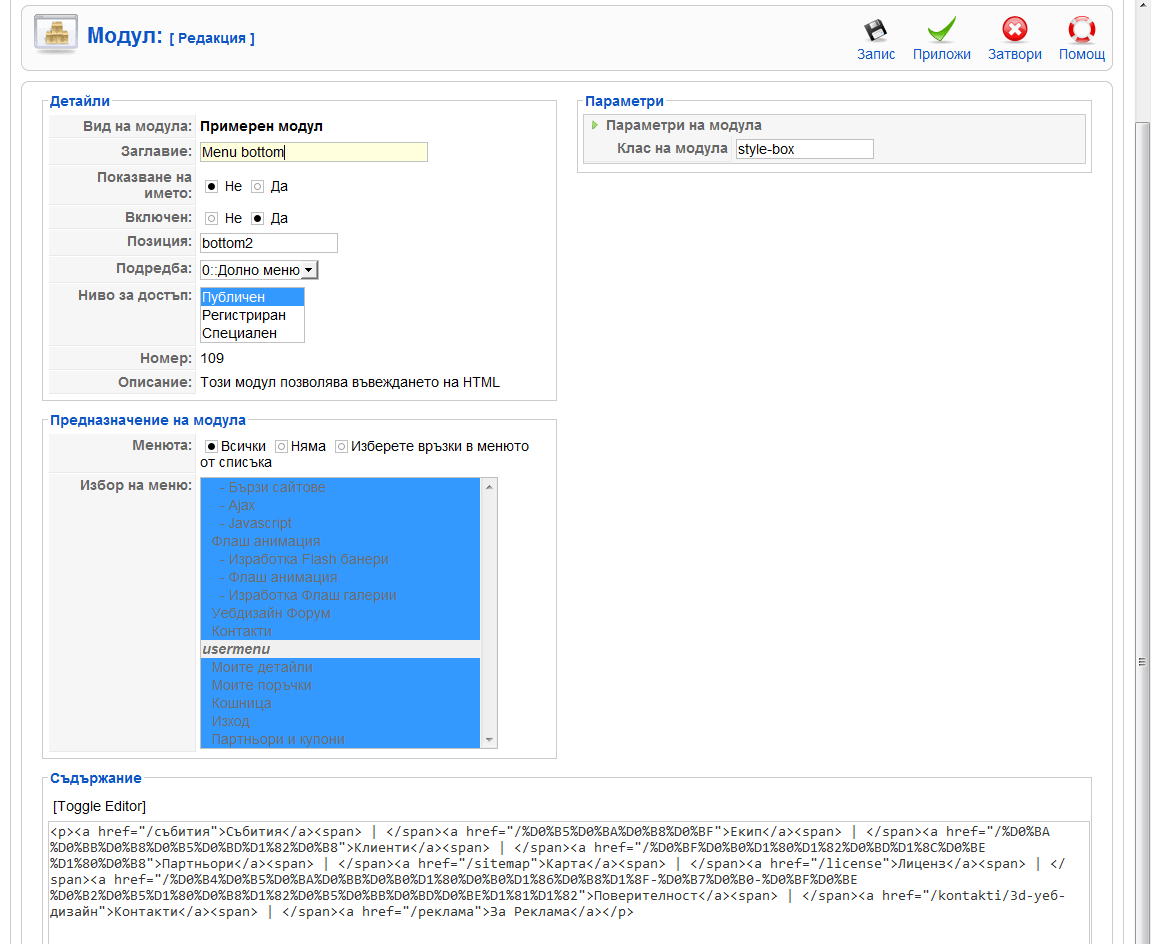 9. On the same principle, I even made the menus on the site static and the load on the server dropped from this by up to 10-15%. Because in the Joomla! menu the modules have a cache, but if you have a multilingual site for multilingualism to work properly, you are disabling the module cache. And every time, every single link is loaded by a database query. And how often do you update your site menus? Rarely? Therefore, it is a good idea to make the menus static, especially if you have a website in more than one language. 10. Optionally, to load the load on the server even more, you can block your site from crawling bad bots with this code (again in the htaccess file): Block bad bots over htaccess. Do all this and you will be guaranteed to download much of the load that your Joomla puts on your server. And your Joomla! site will become much faster, which has many benefits: more satisfied users, more sales, better Google ranking. You want to order such a services for your website? Contact us from here. If you think our guide helped you, you can buy me a coffee from here: https://www.paypal.me/3dwebdesign/1 -------------------- Правила на форума | Forum Rules | How to receive support. 3D Web Design: Уеб дизайн, Seo оптимизация, Web Site Extensions, Oscommerce Addons, Wordpress plugins and Joomla Extensions. Изработка на уеб сайтове и оптимизация на сайт за търсачки и Seo услуги.
|
 |
 
|


|
1 User(s) are reading this topic (1 Guests and 0 Anonymous Users)
0 Members:


Similar Topics
| Topic | Replies | Topic Starter | Views | Last Action | |
|---|---|---|---|---|---|
 |
Pinned:  Joomla Scraper, Grabber For Joomla Joomla Scraper, Grabber For JoomlaJoomla Scraper Can Grab Any Content From Any Website |
86 | Web Design Seo | 672,646 | 8th September 2021 - 07:02 AM Last post by: Web Design Seo |
 |
How To Block Bad Bots On My Website .htaccess Code code for .htaccess |
3 | Web Design Seo | 90,430 | 15th January 2020 - 07:46 AM Last post by: Web Design Seo |
|
Pinned: Joomla Vulnerable Extensions List list with new Joomla exploits |
20 | Web Design Seo | 457,619 | 26th September 2018 - 05:07 AM Last post by: Web Design Seo |
|
Pinned: How To Check Aged Domain Names Quality old domain for sale - check quality first! |
3 | Web Design Seo | 107,872 | 10th September 2018 - 06:22 AM Last post by: Web Design Seo |
|
Pinned: Joomla Pagination Seo Plugin SEO plugin for Joomla Pagination that work in all Joomla |
61 | Web Design Seo | 562,149 | 13th March 2018 - 10:05 AM Last post by: mxcpz |
|
Pinned: Joomla Scraper Going Open Source No licenses, use scraper on unlimited number of web sites |
0 | Web Design Seo | 416,204 | 8th March 2017 - 07:40 AM Last post by: Web Design Seo |
|
How To Boost Onpage Seo Of My Website fast and power way to find the right keywords and to rank it quickly |
0 | Web Design Seo | 93,179 | 16th January 2017 - 01:47 PM Last post by: Web Design Seo |
|
Joomla Ден 2016 Joomla Day 2016 |
1 | Web Design Seo | 369,653 | 31st October 2016 - 10:11 AM Last post by: Web Design Seo |
|
Joomla Post By Email To K2 Extra Fields | 1 | uglykidjoe | 286,825 | 11th February 2016 - 07:45 AM Last post by: Web Design Seo |
|
Pinned: Joomla Scraper Integration With K2 better integration of Joomla Scraper and K2 |
8 | Web Design Seo | 316,375 | 2nd January 2016 - 09:07 AM Last post by: b_goranov |

|
Lo-Fi Version | Time is now: 15th October 2026 - 04:06 PM |