


 How To Test Post By Email Component, configuration of example email box How To Test Post By Email Component, configuration of example email box |
  |

 Feb 15 2011, 10:40 AM Feb 15 2011, 10:40 AM
Post
#1
|
|
 Web Design Seo  Group: Root Admin Posts: 4,332 Joined: 29-April 09 From: Sofia Member No.: 1  |
To test post by email you can do this simple test: First Create one test email in your site - name "test" with options like on screen. 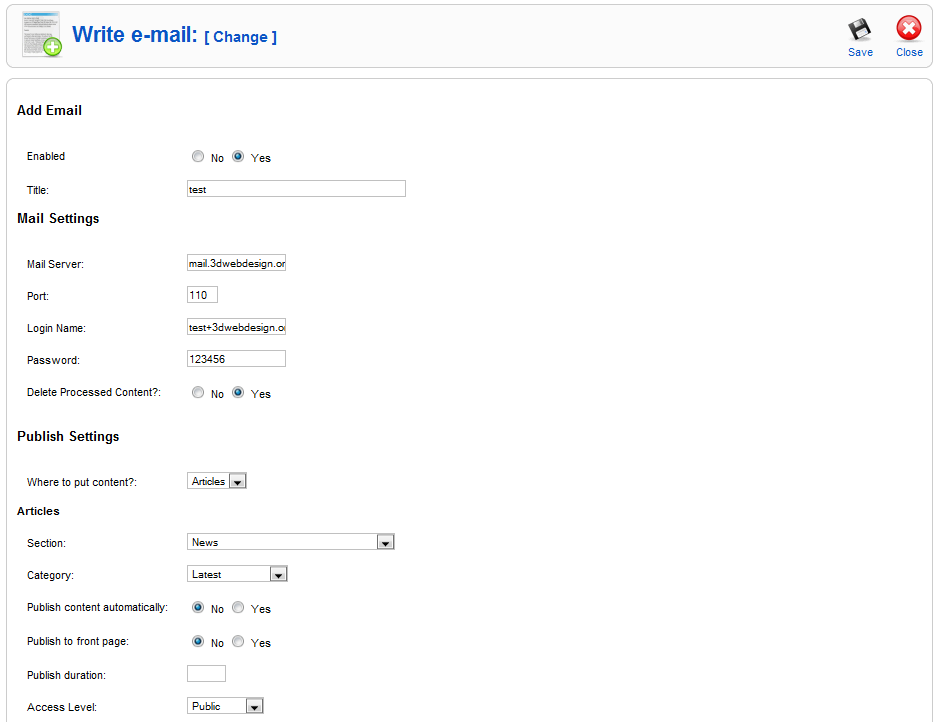 To test yourself: 1. Send some email to some email address, for example: test @ 3dwebdesign.org (account not exist, is deleted long time a go) 2. Click on button "Import" in your admin for this email "TEST". 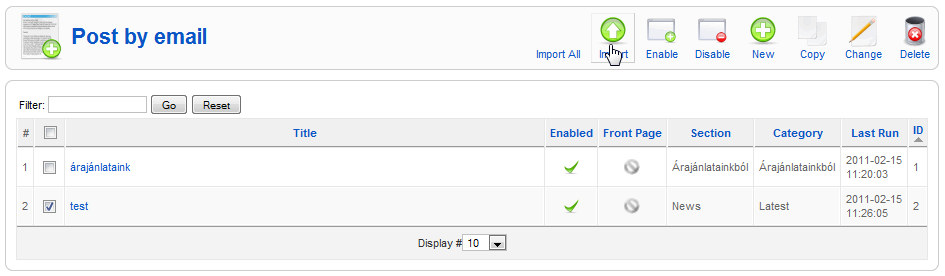 You will see that email that you just sent to email box test at (@) 3dwebdesign.org will be imported in your website. Ready. Where to see email preferences? Email settings are visible in hosting control panel only. This info is visible at this page: Код link-to-control-panel-of-host/frontend/x3/mail/clientconf.html?acct=email@web-site.com What must be in Option PORT? If you use SSL, port must be 995 If not using SSL, port must be 110. Note that only Post by Email Pro version support SSL! -------------------- Правила на форума | Forum Rules | How to receive support. 3D Web Design: Уеб дизайн, Seo оптимизация, Web Site Extensions, Oscommerce Addons, Wordpress plugins and Joomla Extensions. Изработка на уеб сайтове и оптимизация на сайт за търсачки и Seo услуги.
|
 |
 
|


|
Mar 30 2012, 01:02 PM
Post
#2
|
|
|
Web Design Seo Group: Root Admin Posts: 4,332 Joined: 29-April 09 From: Sofia Member No.: 1 |
We see some funny attempts of some spammer to use our test email to send spam. Password of test email is changed. If you want to test component, test with your own email box.
-------------------- Правила на форума | Forum Rules | How to receive support. 3D Web Design: Уеб дизайн, Seo оптимизация, Web Site Extensions, Oscommerce Addons, Wordpress plugins and Joomla Extensions. Изработка на уеб сайтове и оптимизация на сайт за търсачки и Seo услуги.
|
|
|
|
|
Nov 19 2013, 01:42 PM
Post
#3
|
|
|
Newbie Group: Members Posts: 1 Joined: 19-November 13 Member No.: 1,900 |
I tried your test, but when I did the import, I got this message: [email.secureserver.net:110]: Unable to establish link to the POP3 server. POP3 connect: Error [110] [Connection timed out]
I've verified that the pop mail server is correct. The port is correct also. I've logged onto the email client and can see emails (that I've sent there). ----------------------- Can you give me a hint as to what might be causing this problem? Thank you. Anne |
|
|
|



|
Nov 19 2013, 02:05 PM
Post
#4
|
|
|
Web Design Seo Group: Root Admin Posts: 4,332 Joined: 29-April 09 From: Sofia Member No.: 1 |
Email test @ 3dwebdesign.org is deleted and not exist. You can see how to configure extension on Post By Email documentation page - read end of first post, from "Where to see email preferences?". All options are shown in your cpanel control panel.
Ports are: 110 for non-ssl. 995 for ssl. -------------------- Правила на форума | Forum Rules | How to receive support. 3D Web Design: Уеб дизайн, Seo оптимизация, Web Site Extensions, Oscommerce Addons, Wordpress plugins and Joomla Extensions. Изработка на уеб сайтове и оптимизация на сайт за търсачки и Seo услуги.
|
|
|
|
|
1 User(s) are reading this topic (1 Guests and 0 Anonymous Users)
0 Members:


Similar Topics


|
Lo-Fi Version | Time is now: 15th October 2026 - 12:18 PM |